Hearts and Butterflies Elements Vector: A Guide to Elegant Design Integration
In the world of digital design, few motifs carry as much immediate emotional weight as the combination of hearts and butterflies. These symbols are universally recognized representations of love, transformation, and natural beauty. However, integrating these classic elements into modern projects requires more than just dropping a clipart image onto a canvas. The Hearts and Butterflies Elements Vector collection offers a sophisticated solution for designers who need versatility without sacrificing quality. Whether you are crafting wedding invitations, branding for a boutique, or creating social media content for Valentine’s Day, understanding how to properly utilize these assets can significantly elevate your final output.
Understanding the Value of Vector Formats
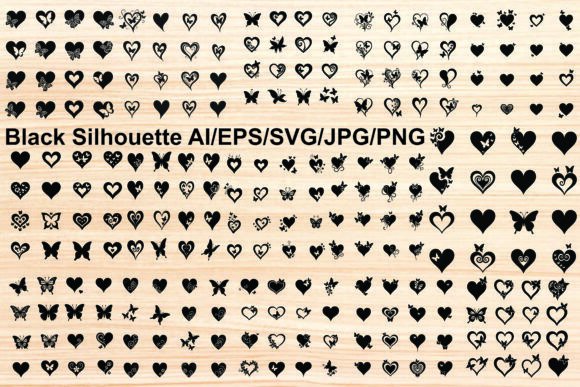
One of the most common misconceptions among beginners is that all digital images are created equal. Many creators download standard JPEG or PNG files, assuming they will suffice for any project. This approach often leads to pixelation when images are resized, resulting in unprofessional-looking prints or blurry web graphics. The primary advantage of using a vector-based collection, such as the Black hearts and butterflies graphic elements, lies in scalability. Vector files, including AI, EPS, and SVG formats, use mathematical paths rather than pixels. This means you can scale a delicate butterfly silhouette from the size of a favicon to a large-format banner without losing any crispness or detail.
When evaluating a design asset, always check for the presence of vector formats. A comprehensive bundle should include AI (Adobe Illustrator), EPS (Encapsulated PostScript), and SVG (Scalable Vector Graphics) files. These formats allow for complete editability. You can change colors, adjust curves, and modify shapes to fit your specific brand palette. Relying solely on raster images like JPG or PNG limits your creative flexibility and can hinder efficiency during the revision process.
Common Pitfalls in Asset Selection and Usage
Even with high-quality files available, designers often make avoidable mistakes that compromise the integrity of their work. Here are several areas where careful attention is required:
- Ignoring File Compatibility: Not all software supports every file type. For instance, while SVG is excellent for web design, it may not open correctly in older versions of desktop publishing software. Always verify which formats your specific tools support before starting a project.
- Overlooking Layer Organization: In complex vector files, elements are often grouped. Failing to ungroup or release compound paths can make editing individual components, such as separating a heart from a decorative swirl, frustratingly difficult. Take time to explore the layer structure of your AI or EPS files.
- Misjudging Contrast and Visibility: Black and white silhouettes are elegant, but they require sufficient contrast to be effective. Placing a black butterfly icon on a dark background renders it invisible. Always test your designs in various lighting conditions and on different mediums.
- Neglecting Licensing Terms: Assuming that "free" or "included" assets can be used for any commercial purpose is a risky oversight. While many bundles offer broad usage rights, it is essential to read the specific license agreement to ensure compliance, especially for client work or merchandise.
Maximizing the Potential of Your Design Bundle
The Hearts and Butterflies Elements Vector package is designed for versatility, containing five distinct file types compressed into a single ZIP archive. To access these resources, you will need to extract the contents using software like WinZip, WinRAR, or the built-in extraction tools available on most operating systems. Simply double-clicking the ZIP file may allow you to view the contents, but extracting them to a dedicated folder ensures better organization and faster access during design sessions.
Once extracted, you will find a diverse array of formats: JPG, PNG, AI, EPS, and SVG. Each serves a unique purpose. Use JPGs for quick previews or web-only applications where transparency is not required. PNGs are ideal for digital overlays due to their transparent backgrounds. For print production and extensive editing, rely on AI and EPS files. SVGs are your go-to for responsive web design and cutting machines used in crafting.
Practical Applications for Various Projects
The utility of this collection extends far beyond simple decoration. Consider these practical applications to enhance your creative workflow:
- Wedding and Anniversary Stationery: The ornate swirls and romantic motifs are perfect for creating cohesive invitation suites. Use the vector hearts as subtle watermarks or border elements to add a touch of elegance without overwhelming the text.
- Brand Identity for Beauty and Wellness: Businesses focused on affection, sentiment, and natural beauty can use butterfly icons to symbolize transformation and growth. These elements work well in logos, business cards, and packaging designs.
- Social Media Content: During celebrations like Valentine’s Day or Mother’s Day, quick-turnaround graphics are essential. Having pre-made, high-quality icons allows marketers and bloggers to create engaging posts rapidly. The isolated nature of the elements makes them easy to composite into existing templates.
- Educational and Craft Resources: Educators and hobbyists can use the SVG files for cutting vinyl decals, paper crafts, or educational materials about nature and insects. The clean lines ensure precise cuts and professional results.
Ensuring Quality and Consistency
To maintain a high standard of design, consistency is key. When using multiple elements from the graphic design element set, ensure that the line weights and styles match. Mixing overly ornate, vintage-style butterflies with minimalist, modern hearts can create visual dissonance unless intentionally done for eclectic effect. Stick to a cohesive aesthetic by selecting elements that share similar design characteristics, such as silhouette style or level of detail.
Additionally, pay attention to the balance between positive and negative space. Decorative elements should enhance, not clutter, your composition. Use the abstract patterns and motifs as accents rather than focal points if your primary goal is communication. For example, a subtle butterfly pattern in the background can add depth to a website header without distracting from the main call-to-action button.
Final Considerations for Smart Design Choices
Investing in a comprehensive vector bundle is a strategic move for any creator. It saves time, reduces costs associated with purchasing individual assets, and ensures a consistent visual language across your projects. By avoiding common pitfalls such as format incompatibility and poor contrast management, you can leverage these romantic and elegant graphics to their fullest potential.
Remember to organize your files logically, keep backups of your original vector sources, and always preview your designs in their intended medium. Whether you are a freelancer designing for clients or a small business owner creating your own marketing materials, the right tools and knowledge empower you to produce work that is both beautiful and effective. Embrace the flexibility of vector art, and let the timeless symbolism of hearts and butterflies add a layer of sophistication to your creative endeavors.